The Cheapest AI Token Is the One You Don't Spend
- ai-engineering
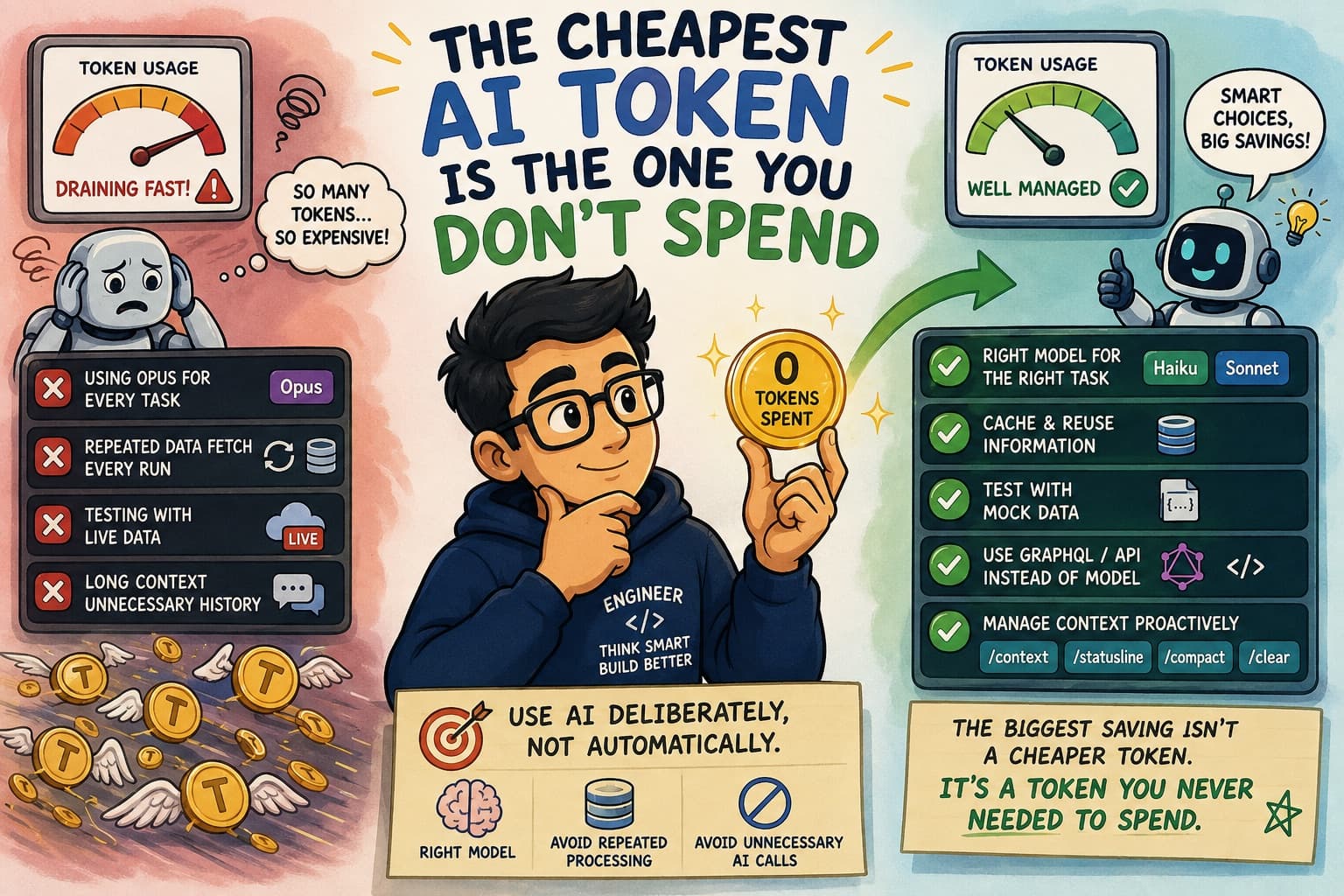
When we talk about the cost of AI, two numbers often come up: the size of the context window and the monthly usage allowance.
Both can sound generous. A one-million-token context window, for example, feels almost impossible to use up.
To put that into perspective, one token is roughly equivalent to 0.75 English words. Using a reading speed of around 225 words per minute, it would take more than two days of continuous reading to work through one million tokens' worth of text.
That sounds like a lot.
But when you start using AI tools as part of your daily engineering workflow, those tokens can disappear much faster than expected.
Every instruction, response, file, tool result and piece of conversation history can contribute to the context. The rate at which we consume our allowance also depends heavily on the model we choose.
Claude offers different model families, including Haiku, Sonnet and Opus. I tend to think about model selection through three factors:
Speed, intelligence and cost.
A more capable model may be useful for complex reasoning, but it will generally cost more. A lighter model may be more than capable of handling summarisation, formatting, classification or other straightforward tasks.
The question I now ask is not:
"What is the most powerful model available?"
It is:
"What is the least expensive model that can complete this task reliably?"
There is little value in paying for a highly capable model when a lighter model can produce the same result.
In Claude Code, the /model command lets us see which model we are using and switch models before starting a task. It sounds like a small decision, but across many tasks and repeated executions, it can make a noticeable difference.
A lesson from my own experience
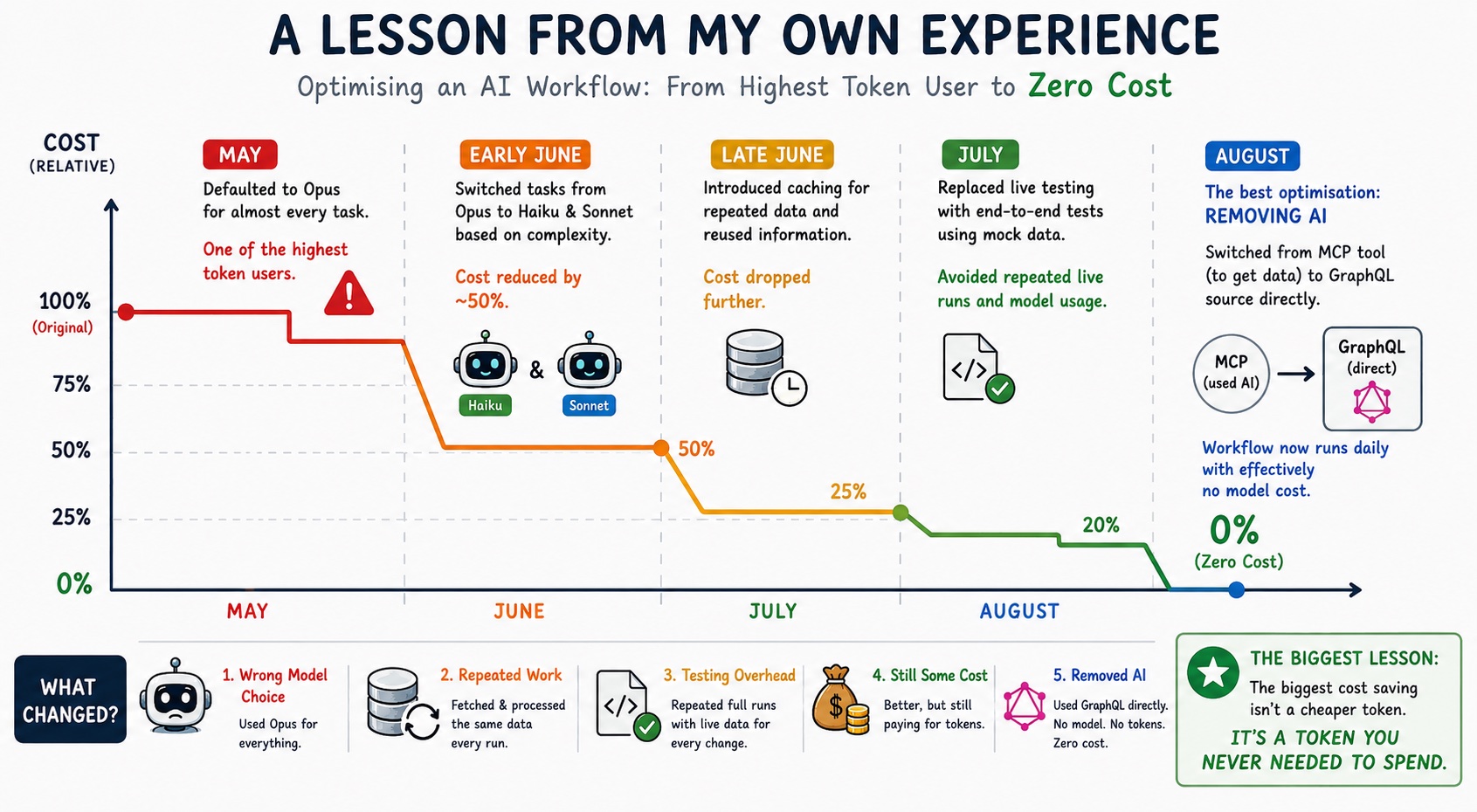
In May, I was running an automated dashboard workflow that collected data from multiple sources, consolidated it and published a report to a Confluence page.
After a few weeks, I was notified that I was one of the highest token users.
That caught my attention.
Until then, I had focused mainly on whether the workflow worked. I hadn't spent enough time thinking about how much each execution cost.
When I investigated, the first issue became obvious: I had defaulted almost every task to Opus.
Not every step required that level of capability.
I reviewed the workflow and distributed the tasks between Haiku and Sonnet based on their complexity. That single change reduced the cost by almost half.
It was an encouraging result, but it also made me curious about what else could be improved.
The next issue was repeated work. During every execution, the workflow was retrieving and processing information that had already been fetched earlier. Much of that data could have been cached and reused.
After introducing a caching strategy, the cost dropped again.
I also realised that my testing approach was adding unnecessary usage.
Whenever I made a change, I ran the complete workflow several times to confirm that the final report looked correct. That meant repeatedly retrieving live data, processing it with the model and publishing the output.
I replaced this with end-to-end testing based on mock data.
Most changes could then be tested without calling the live data sources or repeatedly using the model. The production report only needed to be published once after testing was complete.
Together, these changes brought the cost down to roughly one-fifth of the original amount.
But there was still a cost.
The best optimisation was removing AI
My manager then asked an important question: could this workflow remain useful over the long term without depending so heavily on the model?
One of the tools I was accessing through MCP had started making the same data available through GraphQL.
I switched the workflow to use that GraphQL source directly.
This removed the need for the model to fetch, interpret and parse the data. The workflow now runs daily with effectively no model cost.
This was probably the most valuable lesson for me:
The biggest cost saving isn't a cheaper token. It's a token you never needed to spend.
AI is extremely useful when a task requires reasoning, interpretation or flexibility. But when a problem can be solved reliably through an API, a query or conventional code, those options are often faster, cheaper and easier to operate.
Using AI strategically doesn't mean using it everywhere
This experience also connected with a point Barry Parker made in his Brighter Perspectives article, Payment resiliency is even more critical in an era of geopolitical uncertainty.
Barry explains that AI shouldn't be viewed purely as an efficiency play. It represents a much broader technology capability, with the potential to help organisations move faster, strengthen their defences and respond to emerging situations in near real time.
I strongly agree with that perspective.
For me, seeing AI as a strategic capability doesn't mean adding a model to every process. It means understanding where AI genuinely creates value and where established engineering approaches remain the better option.
In my dashboard workflow, AI initially helped me get the solution working quickly. As the workflow matured, I was able to move deterministic steps to caching, mock data, GraphQL and conventional code while keeping AI available for the areas that genuinely required reasoning.
That is how I'm trying to put the principle into practice:
Use AI deliberately, not automatically.
The objective is not simply to reduce cost. It is to build solutions that are sustainable, reliable and appropriate for the problem being solved.
Learning to manage context before it manages you
My understanding of context management also developed through experience.
Initially, I would continue working in the same Claude Code session until the conversation became too large or the responses started losing focus.
Only then would I think about clearing the session and starting again.
The /clear command was useful in those situations. It gave me a fresh context and removed the conversation history that was no longer relevant.
However, clearing everything isn't always practical.
Sometimes you're in the middle of a task and still need the important decisions, findings and instructions from the earlier conversation. That is where /compact becomes useful. Instead of removing the entire conversation, it summarises the work so far and frees up context while allowing you to continue.
Over time, I realised that the goal shouldn't be to wait until the context is almost full and then react.
The better approach is to understand how quickly it is growing and plan ahead.
The /context command helps show how much context has been consumed, while /statusline can keep that usage visible as you work. This makes it easier to plan ahead rather than waiting until the session becomes too large. Context management isn't just about staying within a technical limit. It is about being deliberate about what information the model genuinely needs.
Every unnecessary instruction, repeated file and outdated piece of conversation has a cost.
My final takeaway
A monthly AI allowance can look difficult to consume.
It isn't.
Using an expensive model for every task, repeatedly processing the same information, carrying unnecessary conversation history and testing against live data can consume a large allowance surprisingly quickly.
Cost management should be part of the workflow from the beginning, not something we consider only after receiving a usage alert.
For each task, I now think about three things: choosing the right model, avoiding repeated processing and deciding whether AI is needed at all.
Sometimes the best optimisation is a smaller model. Sometimes it is caching, mock data or better context management. And sometimes it is replacing the model call with code, an API or a query.
More advanced techniques, such as prompt caching, can reduce costs further by reusing stable parts of a prompt or context. This can be particularly useful when the same instructions or reference material are sent repeatedly.
AI pricing, usage limits and platform policies will continue to change. As adoption grows, today's generous allowances may not remain at the same level.
That makes it even more important to understand where our tokens are going and build cost awareness into the way we design AI-enabled workflows.
The goal isn't simply to use less AI.
The goal is to use AI where it adds real value—and avoid spending tokens where it doesn't.
Note: This article is written through a Claude Code lens because that is the tool I used for this particular workflow. The underlying ideas—selecting the right model, managing context, caching repeated information, testing with mock data and avoiding unnecessary model calls—are applicable across AI coding assistants, agentic tools and other AI platforms. The commands and terminology may differ, but the cost-management principles remain largely the same.